Interaction

With LISTEN, you can not only listen to and distribute podcasts, but also use comment features, hashtag features, trackback features, messaging features, and gift features.

These features allow you to cross the boundaries of listeners and podcasters and interact with other people who like podcasts.

Comments

You can use the comment function to send your thoughts to others.

  • Comment on an episode

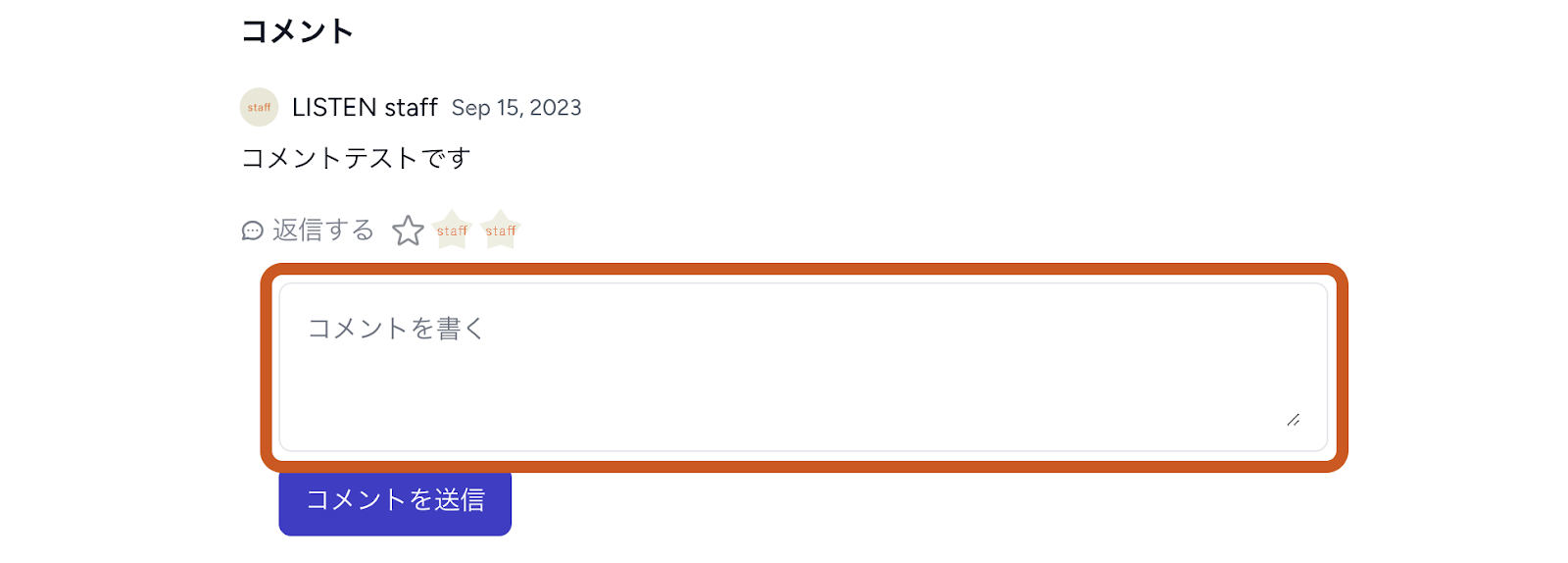
Open the page of the episode you want to comment on and scroll down.

Enter your comment in the "Write a comment" field and click " Submit".

  • React to the comments you receive

①☆ mark (like)

Click the ☆ mark under the comment you wish to give a star.

An icon of yourself in the shape of a star will appear as many times as you click on the ☆ symbol.

②Reply

Click "Reply" under the comment you wish to reply to.

Enter your comment and click " Submit".

The replied comment will appear slightly shifted below the original comment.


Hashtags (#)

Hashtags can be used to connect with others on the same topic.

  • Adding a hashtag (for podcasters)

Enter "#" and the keyword you want to tag in the episode summary field, and click "Submit.  (The "#" must be one-byte characters. Double-byte characters will not be recognized as a hashtag and will not link to the tag page.)

When "#00" is underlined and displayed, the setting is complete.

  • Find by Hashtag

Click on the hashtag ("#00") in the episode summary column.

The tag page will open, displaying episodes with the same hashtag.


Trackback (mention function)

You can use the Trackback function to connect podcasts and episodes to each other.

  • Mentioning a podcast or episode (for podcasters)

Describe the podcast or episode you want to mention in the episode summary field.

Select the section you want to link to and click the chain symbol.

Enter the URL of the podcast or episode you want to mention and click the check mark in the lower left corner.

(If you want the linked page to open in a new tab, set "Open in a new tab" to on.)

If the text is bold and underlined, the setting is complete.

  • Finding Mentioned Episodes

If an episode is mentioned in other episodes, "◯Mention" (◯ is the number of mentions) will be displayed under the title.

If you scroll down the screen, you will find a list of episodes that have mentioned the episode under "Episodes Mentioning this episode," making it easy to find the episode that has been mentioned.


Message 

You can send messages to programs and podcasters to interact with them.

  • Sending Messages

Messages can be sent from the following locations:

・Podcast Page
・Episode Page
・Player's Episode Information Display Window


If multiple people manage a program, messages sent to the program will be delivered to all managing members.

Click “Send Message” displayed on the Podcast Page / Episode Page / Player's Episode Information Display Window.


Gift Feature

Listeners can send gifts to their favorite shows and podcasters.

  • How to Send Gifts

For podcasters who have enabled monetization, the “Send Gifts” option appears above the “Add a Star” button on their show page.

Gifts can be selected and sent from items priced between ¥50 and ¥10,000.

  • After sending/receiving a gift

The program where the gift was sent will display the received gift, sender, and comment.
The sender and comment will be displayed publicly. Please use the messaging feature for private content.